

Open the free Plinko game
Press the load button once and allow the provider’s game to initialise. The embedded game is an external service, so its loading time is separate from the article’s. The official new-tab link offers another way to open the same public FUN demo if the frame is blocked or uncomfortable on your device. It is not a registration or deposit link.
Read the unit next to the balance before touching Play. FUN is practice credit, not a euro amount and not a balance that can later be cashed out. A large demo return is useful for understanding a multiplier, but it says nothing about an app’s withdrawals. If that is your question, use the app and payment-claim guide separately.
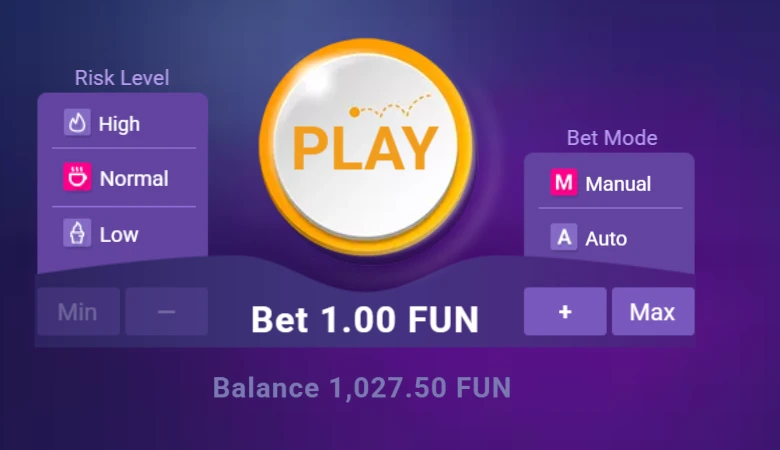
Set rows, risk and stake
Lines selects 8 through 16 rows. At 16 rows the board has 17 pockets, and it matches the tables analysed in this guide. Risk Level has Low, Normal and High. Changing risk replaces the payout table without changing the landing probabilities at the same row count. Compare the printed centre and edge values after a change rather than assuming the colourful board still pays the old amounts.
The stake sits below Play. The minus and plus controls change it; Min and Max are shortcuts, not strategy recommendations. Check the displayed amount after each adjustment. A test described as “one FUN per drop” is only comparable if that amount stays at 1. Changing both risk and stake at once makes it harder to tell what caused a larger balance swing.
- Choose Manual mode and Lines 16.
- Select one risk and read its table.
- Set and verify a 1 FUN stake.
- Press Play once, then read the settled result.
The stake steps we actually checked
Pressing plus from the minimum selected 1, 2, 3, 5, 10, 15, 20, 30, 50, 75 and 100 FUN. It did not offer 4, 8, 16, 32 or 64 FUN. We saved the controls without placing more bets. A textbook progression may therefore need adjustment before it can be followed in this interface. The simulator has separate cent-model and observed-demo-step settings.
Read a complete round: stake, return, net
The multiplier applies to the stake. At 1 FUN, 0.5× returns 0.50 FUN and loses 0.50 net; 1× returns the original stake and breaks even; 2× returns 2 FUN and gains 1 net. The amount credited after a ball lands is not all profit. Subtract the stake once, and only once, to calculate the result.
Low at 16 rows has a 0.5× centre and 16× edges. Normal has 0.3× and 110×. High has five central pockets at 0.2× and 1,000× at the two extreme edges. The centre is much more likely than an edge, so the largest printed number is a poor summary of what ordinary drops do. The complete illustrated rules explain the history columns and each control in more detail.

A ten-drop practice sheet
Keep one risk and stake fixed for ten manual drops. For each, note the multiplier, returned credits and net result. Add the net column and compare it with the balance change. This small exercise checks that you can read the interface; ten drops cannot estimate the long-run RTP or prove a strategy. Label it as your practice, not part of our measured 3,000-drop study.
If you repeat on another risk, begin a new sheet with that risk clearly named. Do not compare two ten-drop totals as if both risks received the same pockets: they are different random samples. To compare stake rules on identical pockets, use the simulator. The recorded study keeps all three thousand-drop samples separate for the same reason.
A worked line from the practice sheet
Suppose the starting balance is 100 FUN and the first stake is 2 FUN. A 0.5× result credits 1 FUN, so the ending balance is 99. The next 2 FUN stake at 1× returns 2 and leaves 99 unchanged. A third 2 FUN stake at 2× returns 4 and takes the balance to 101. Across those three hypothetical drops, turnover is 6, gross return is 7 and net is +1. The example is arithmetic, not a sequence taken from our sample.
That small ledger also shows why counting winning animations is unreliable. One drop loses, one breaks even and one profits. If the interface highlights all three returned amounts, the colours do not change their net meaning. For a progression, decide the next stake only after classifying that net result. Our rules keep the current level after exact break-even; they do not count a 1× return as either a win or a loss.
Phone controls and a game that will not load
Use the game’s responsive layout on a phone and wait for controls to appear before tapping. If a narrow browser frame makes a label unreadable, open the official new-tab link or rotate the device. Do not repeatedly press the load or Play button to make an animation catch up: extra presses can be accepted as additional drops. Read the history and balance after the results settle.
If the frame stays blank, try the official link once and note whether it shows a provider error. Browser restrictions, an external outage or network filtering can affect the game independently of this page. Do not install an unknown app to “repair” the demo. You can still use the local simulator to inspect stake rules while an external loading issue is unresolved.
Animation speed and the number of accepted bets
A ball still moving does not necessarily mean the game has not settled its result. In our rapid recording, visible animations could lag behind accepted results. That is why the study counts completed game records and checks balances rather than counting moving balls in a video. For ordinary manual practice, waiting for each result is simpler and reduces confusion about how many stakes were committed.
If several drops are already accepted, pressing Stop in an automatic mode should not be assumed to cancel those stakes retroactively. Read the game’s state and history. Our simulator has no moving-ball delay: its table records the calculation immediately, while its stop rule is evaluated after the return from each placed bet. These are different interfaces, so do not infer one tool’s controls from the other.

From controls to a strategy test
Once the stake and net result are clear, choose one of the ten betting rules. Write down when it changes the next stake and what stops it. A Martingale example with base 1 and cap 64 allows seven stakes before blocking 128. It does not guarantee recovery: seven High results at 0.2× lose 101.60 FUN net even though each ball returns something.
Our study found profitable historical configurations, and the predictor guide explains how to test them without pretending to know the next pocket. The useful step after a promising graph is a clearly labelled check on data excluded from selection. The FUN demo teaches the interface; it does not establish a suitable Italian operator, cash reliability or a future winning method.
Common questions
Is this Plinko demo free?
Yes. The public BGaming demo uses virtual FUN credits with no deposit, cash value or withdrawal.
Do I need a Plinko APK?
No. This demo opens in a browser, either in the page or through the official new-tab link.